
macOS terminal security
Bringing macOS security to the terminal.
Apple spent years giving apps stable identities, restricted data access, and explicit user consent. Most CLI tools still run inside the authority of whichever app launched them. That may be Terminal, an editor, or an AI harness.
Published July 12, 2026
The app that hosts your shell defines much of the command’s macOS security context. As more work moves from Terminal into agent harnesses, that host becomes part of every CLI trust decision.
macOS Knows Apps
the established boundaryApple has added several layers of protection around Mac apps. Code signing gives software a stable identity and lets macOS detect changes. Notarization checks distributed software before users run it. App Sandbox limits access to files, devices, and network capabilities. Privacy controls make people approve access to protected data such as contacts, calendars, the camera, and files owned by other apps.
Command-line executables can be signed, hardened, and notarized too. Those protections establish where a binary came from and whether anyone changed it. A typical tool installed into /opt/homebrew/bin still lacks an independent sandbox and its own row of carefully chosen privacy permissions.
A CLI Inherits Its Room
launcher authorityA shell launches child processes. Those processes run as your Unix user and receive the environment, open file descriptors, working directory, and other context passed down by their parent. Apple also requires a command-line helper inside a sandboxed app to inherit the containing app’s sandbox configuration.
In everyday terminal use, macOS presents many privacy decisions at the host-app boundary. You grant access to Terminal, iTerm, an editor, or another application. Every command launched inside that room can then make use of the room’s authority unless another control intervenes.
For years this arrangement was easy to reason about. You opened Terminal and typed a command. The terminal application was the obvious host, and you were the person driving it.
The Harness Is Now the Terminal
agent executionDevelopers now run commands from AI desktop apps, code editors, background automation, and agent harnesses. A harness can start gh, aws, kubectl, or a package installer without a visible shell window. The child process still arrives with authority derived from the app and user session that launched it.
This changes the trust question. “Do I trust gh?” is incomplete. You also need to ask whether you trust this launcher to make this gh request, from this directory, with this credential.
Giving an agent harness broad file or privacy access may be necessary for useful work. That grant should not silently become permanent authority for every CLI the harness can invoke.
A Terminal-Layer Boundary
identity and consentIdentify the executable
Use its code-signing identity and resolved path, so a lookalike binary cannot borrow the policy of the real tool.
Identify the hosting app
Follow the process chain to the signed app that initiated the work, whether that is Terminal, an editor, or an agent harness.
Approve the sensitive action
Bind access to the tool, launcher, command, directory, and requested secret. Record the resulting decision locally.
The Automic Vault Boundary
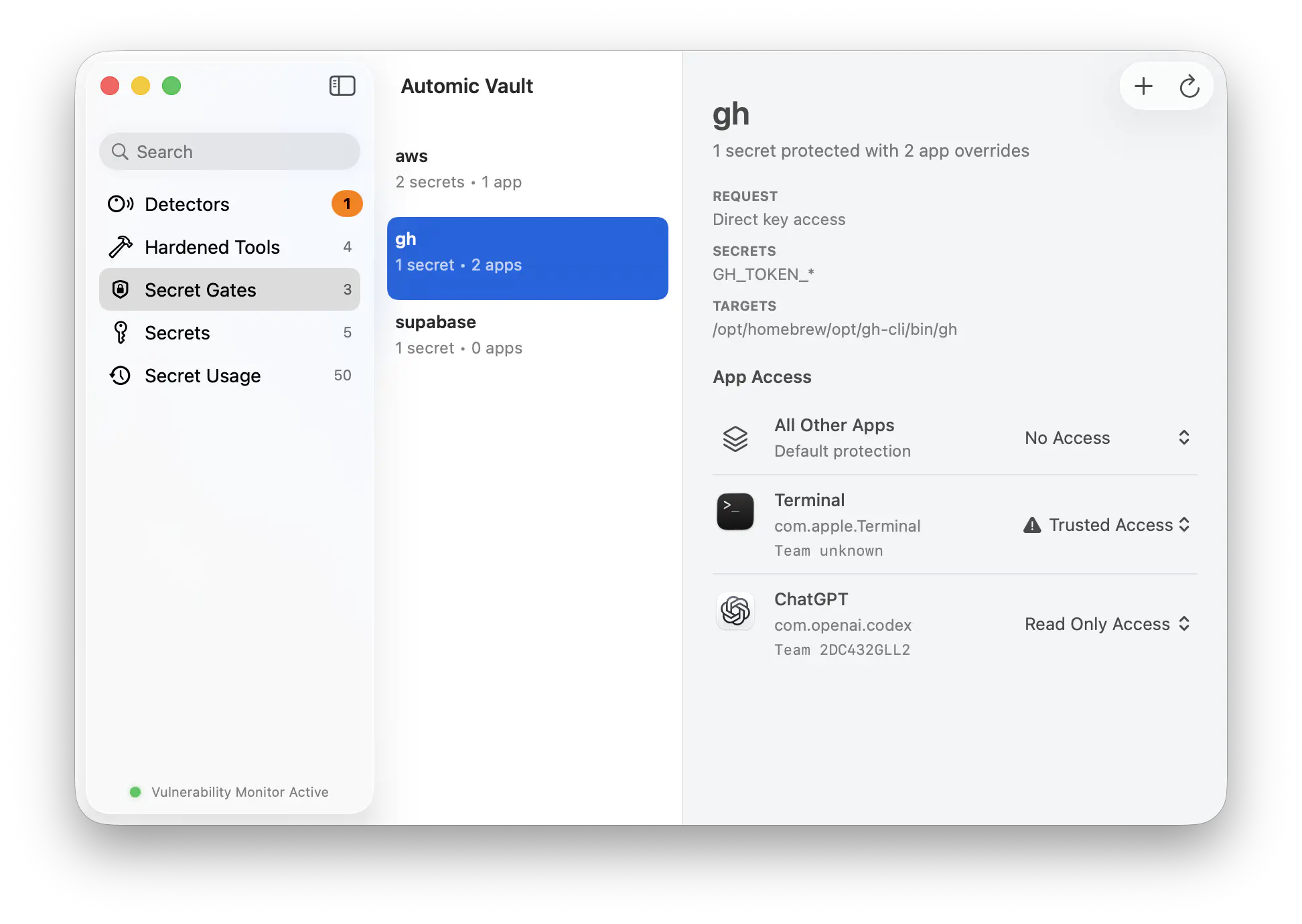
per-launcher policyAutomic Vault resolves both the credential-bearing Target and the Verified Launcher above it. You can choose Write Access when Terminal launches a named Tool while requiring Approval when Codex, another harness, or an unknown app launches the same executable.
The Credential stays out of plaintext dotfiles and out of the Launcher’s ambient environment. At request time, Automic Vault can show the Launcher, Target, command, working directory, and Secret Name before you approve or deny the Secret Application. Authorization History retains the same context afterward.
Automic Vault focuses on Secret Application and sensitive Tool execution. General filesystem and network containment remain the responsibility of macOS and the host app. The result brings stable identity, least authority, explicit consent, and bounded local history to the terminal layer where developer credentials get used.