
AWS credential security
The best fricking AWS credential manager in the world.
Automic Vault stores long-lived keys in Keychain and gives the AWS CLI temporary credentials for one verified process under a policy for the command and signed app. Operations that require the original keys hit a large warning.
Published August 5, 2026
For Mac developers who still need AWS access keys, no other credential manager combines Keychain storage, per-command authorization, signed-launcher policy, process-bound credential delivery, short-lived sessions, MFA, roles, and a local audit record. We think that makes Automic Vault the best AWS credential manager available.
Access Keys Need a Runtime Boundary
the missing controlAWS access keys often begin in ~/.aws/credentials. Any process running as you can read that file. Moving the pair into Keychain protects storage, but a useful credential manager must still release credentials when aws runs.
aws-vault set the standard here. It stores keys in a secure backend, calls AWS STS, and exposes temporary credentials to a child process through environment variables or a local metadata server. We used it. It remains good software.
Agents raised a harder question: which app launched aws, which operation did it request, and should that combination receive credentials without asking you? A wrapper around a shell session cannot answer that with the macOS identity and approval model.
You Still Type aws
one command
av harden aws
aws sts get-caller-identity
The hardener imports the default access key pair into the macOS Keychain and installs a protected launcher at /usr/local/bin/aws. Your shell, scripts, and agents keep invoking aws. They never receive the stored keys in their ambient environment.
The launcher registers the AWS arguments, selected profile, process ID, process start time, and a snapshot of the AWS config with the Automic Vault app. It then replaces itself with the Homebrew AWS CLI.
The Credential Helper Knows Its Parent
process-bound deliveryThe AWS CLI receives a minimal config containing Automic Vault's credential_process. AWS starts the helper as a child. The helper checks that its immediate parent has the registered PID and start time, uses the expected interpreter, and still has the approved arguments.
A copied helper command cannot fetch credentials from another process. A stale registration cannot be replayed after aws exits. Each AWS invocation gets its own in-memory credential cache, which disappears with that process.
Automic Vault runs the credential-bearing AWS process with an empty home and disables the normal ambient provider paths. Shared credential files, instance metadata, web identity, container credentials, plugins, aliases, pager hooks, and user-supplied credential processes stay outside that process.
Temporary Credentials by Default
STS and MFAThe menu app calls AWS STS GetSessionToken and AssumeRole itself. Normal commands receive temporary credentials. Profiles with mfa_serial get an Automic Vault MFA prompt, and role profiles receive a role session rooted at the protected default keys.
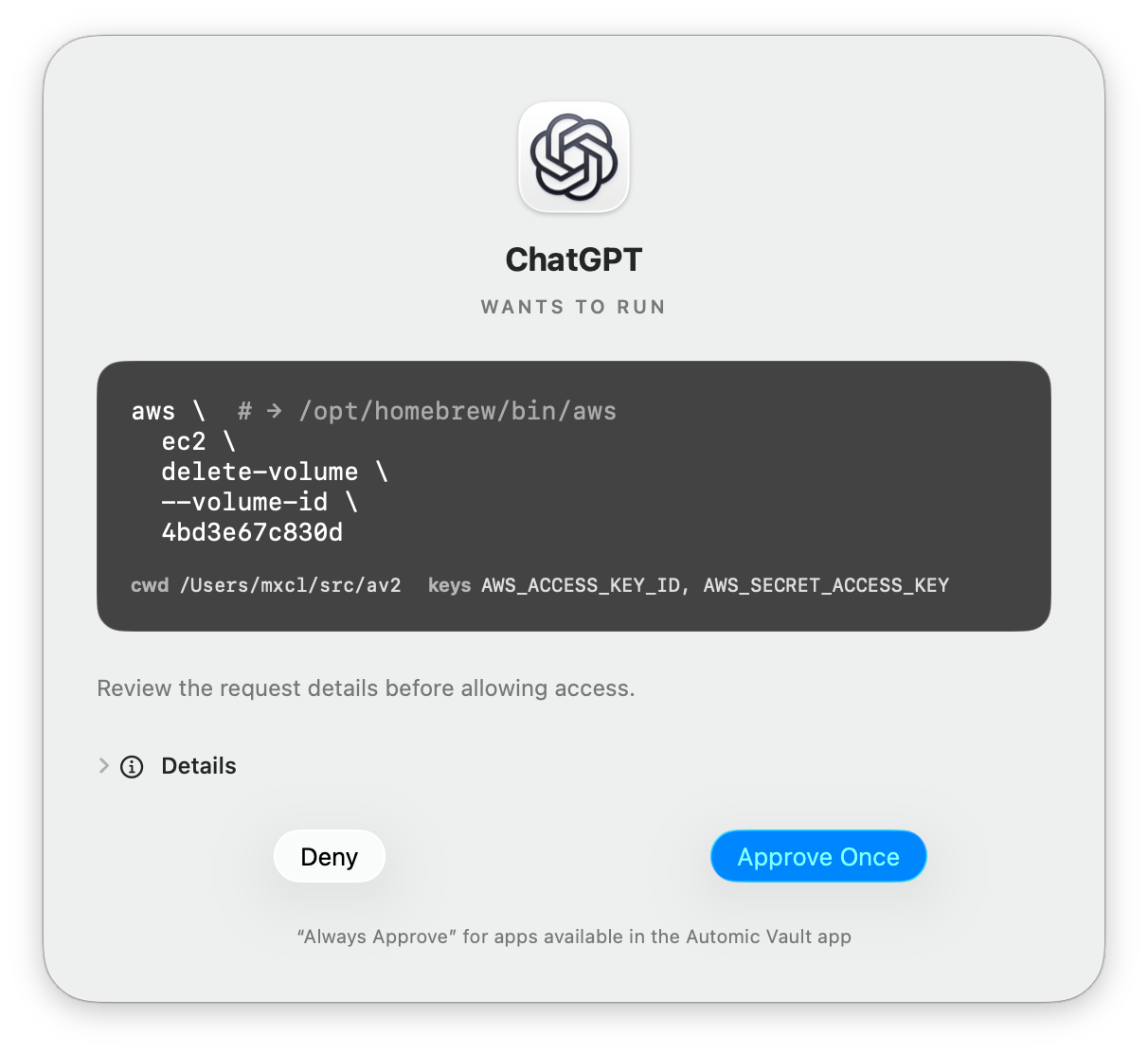
AWS restricts non-MFA GetSessionToken credentials from IAM and most STS operations. Those commands may need the original reusable keys. Automic Vault treats that as Elevated Secret Application and puts a large warning in the Approval window. Write Access still asks. Full Access may automically authorize the recognized operation when you choose it for the Launcher or an exact Blessed Script.
Policy Follows the Launcher
Terminal is not your agentTerminal, Codex, an editor, and an unknown process can invoke the same AWS binary. Automic Vault follows the process chain to the signed app and gives each launcher its own Secret Gate level.
Agents inspect without deploying
Commands classified as reads can proceed. Mutations and secret-revealing operations ask first.
Your terminal can work
Normal operations follow command policy. Requests that reveal long-lived keys keep the gate.
You retain the dangerous knob
An explicit launcher rule or blessed script can do everything. The approval UI says what that means.
Authorization History records the Launcher, command, directory, requested Secret Names, and decision. The Authorization Policy and local record exist below the agent harness, so no agent integration has to cooperate.
A Narrow Model That Fails Closed
supported on purposeAutomic Vault supports the imported default keys, regions, MFA, and role profiles whose source_profile chain ends at default. SSO, web identity, credential_source, independent named static keys, and custom credential processes fail with a precise error.
The upstream AWS CLI remains a large Python program that Automic Vault cannot harden from within. End-to-end integrity depends on protecting its Homebrew distribution and interpreter. av harden brew is optional because developers deserve the knob, but we recommend it for the full security boundary.
Yes, We Mean Best
for AWS access keys on macOSAWS Identity Center and workload identity should replace long-lived IAM user keys where they fit. Plenty of developers still have keys, MFA devices, and role chains on their Macs. Those credentials deserve more than secure storage and a shell wrapper.
Automic Vault narrows credential issuance to one live AWS process. It accounts for the Verified Launcher and command. It uses temporary sessions, warns before Elevated Secret Application, records the Authorization Decision, and leaves the dangerous policy choices in your hands.